






Join the GenieLab Community
Receive regular updates and inspiration to help your business stay ahead of the game.
Need Assistance?
Contact US today It’s free – Click HERE.You may also like...

Magento to Shopify Migration Cost: A Realistic Breakdown
What a Magento to Shopify Migration Actually Costs There's no single number that applies to every Magento to Shopify ...

Multichannel Platform Migration Top 7 Safest Options
Safely scale revenue across channels by pairing the right platform with a disciplined plan. This multi-channel mig...

Shopify Plus Advanced Integrations: Connecting ERPs, CRMs, and Third-Party Systems
Drive Shopify Plus success by unifying ERP, CRM, and 3PL into one dependable data flow. Map SKUs, prices, and IDs; de...

How to Choose a Shopify Plus Migration Agency: The Complete Buyer’s Guide
Replatforming demands strategic planning, rigorous data integrity, SEO preservation, and near-zero downtime. Choose a...

How to Find an eCommerce Migration Agency That Won’t Tank Your SEO
Why Platform Migration Is an SEO Risk — and How to Manage It Every platform migration carries SEO risk. When you move...

Product Catalogue Migration to Shopify: Handling SKUs, Variants, and Custom Data
Key Highlights — Reduce downtime and data errors during product catalogue migration by using proven partners and clea...
Speeding Up Magento: Practical Steps to Boost Magento Performance and Conversions
Image Source
Magento is one of the most powerful ecommerce platforms available and is officially the most used platform out there. Magento has 23.77% market share followed by WooCommerce at 22.14%. Its rich feature set, flexibility, and scalability make it a favorite for ambitious online retailers that need custom catalogs, multi-store capabilities, and robust integrations.
However, Magento is a big, feature-rich platform, so it’s not lightweight or nimble by default. If Magento is not configured correctly it can feel unacceptably slow, which can hurt user experience, suppress conversion rates, and increase bounce. This guide focuses on straightforward configuration changes and practical housekeeping to improve Magento performance without changing your theme or codebase. Version note: The admin paths and features referenced (e.g., Compilation, Flat Catalog) reflect Magento 1.x; Magento 2 uses different tooling and paths.
Follow this guide to speed up your Magento store.
1. Edit the .htaccess file for Magento performance
Boost Magento Performance with Gzip Compression
To further enhance Magento performance, enabling Gzip compression allows your web server to send smaller file sizes to the browser, resulting in faster transfer times and improved perceived speed. This is one of the easiest ways of speeding up a Magento website, so it belongs near the top of any optimization checklist.
Quick steps to enable Gzip safely:
- Back up your current .htaccess file from your Magento root directory.
- Locate the section that handles compression and ensure common MIME types (HTML, CSS, JS, JSON, XML, fonts, and SVG) are included.
- Save the file, clear Magento’s cache, and hard-refresh your browser to test.
- Verify compression with your browser’s developer tools by checking the response headers for Content-Encoding: gzip.
Enhance Magento User Experience with Expires Headers for Caching
Expires headers tell the browser how long it should cache files locally. While often used for images, it’s best practice to apply sensible lifetimes to stylesheets, scripts, and other static assets as well. Proper browser caching reduces repeat downloads and speeds up return visits, boosting Magento performance.
When you use a far-future Expires header (paired with versioned asset URLs), the browser can reuse previously cached files on subsequent page loads. That means when a user returns, key assets may already be stored locally, resulting in a smoother, faster browsing experience.
Implementation checklist:
- In .htaccess, set ExpiresDefault and specific rules for images, CSS/JS, fonts, and media.
- Use versioned filenames or query strings so updates bust the cache reliably.
- After changes, clear Magento’s cache and validate in the browser’s network panel that assets are served from disk cache on repeat loads.
2. Magento Admin Tweaks to Speed Up Magento Performance
To further enhance Magento performance, the Magento Admin panel offers several settings you can adjust to reduce page weight, limit database overhead, and speed up your site without altering your theme. The following steps are beginner-friendly and safe to test on a staging environment before rolling into production.
Accelerate Magento Load Times by Merging JavaScript and CSS
Merging assets reduces the total number of HTTP requests, which can lower latency and help pages render faster. Here’s how to enable it and validate the results:
- Go to System > Configuration > Developer.
- Under “Javascript Settings”, change “Merge Javascript Files” to YES.
- Under “CSS Settings”, change “Merge CSS Files” to YES, if available in your version.
- Clear caches and reindex if prompted.
- Open a product or category page and use your browser’s network tab to confirm the request count drops and merged files appear.
- If you encounter layout issues, disable one setting at a time to isolate the cause and retest.

Improve Magento Performance with Flat Catalog
Magento stores its customer and product data using an EAV (Entity-Attribute-Value) model. By enabling Flat Product and Flat Category, Magento consolidates category and product attributes into flat tables. This reduces the time Magento spends querying across many tables, which can make category and product pages load quicker, especially on larger catalogs.

You can enable flat catalog here:
-
In the Magento Admin, go to System > Configuration > Catalog.
-
Under “Frontend”, change “Use Flat Catalog Category” to YES.
-
Under “Frontend”, change “Use Flat Catalog Product” to YES. (optional)
-
Clear the cache and reindex data for catalog-related indexes.

Speed Up Magento with Compilation
In the Magento Admin, navigate to System > Tools > Compilation and enable it to optimize class loading. This can improve performance by reducing file system lookups. Note: This Compilation screen is specific to Magento 1.x; Magento 2 uses a different build/compile process.
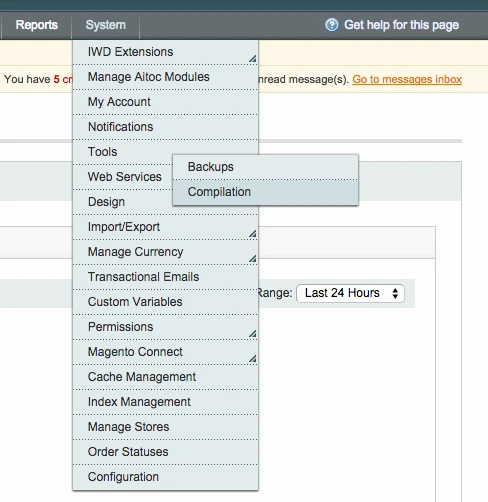
Please note: if you have custom modifications to Magento or extensions installed, enabling compilation may break your store. Proceed with caution and test on a staging server first. If issues arise, disable compilation and recheck compatibility with your modules.
Improve Magento Performance with Caching
Magento’s core caches (configuration, layouts, and blocks) can be written to the file system to reduce repetitive processing. You can expect a noticeable performance improvement for the average Magento website with these core/layout/block caches enabled. This differs from Full‑Page Cache (FPC), which stores entire pages and is covered later below.
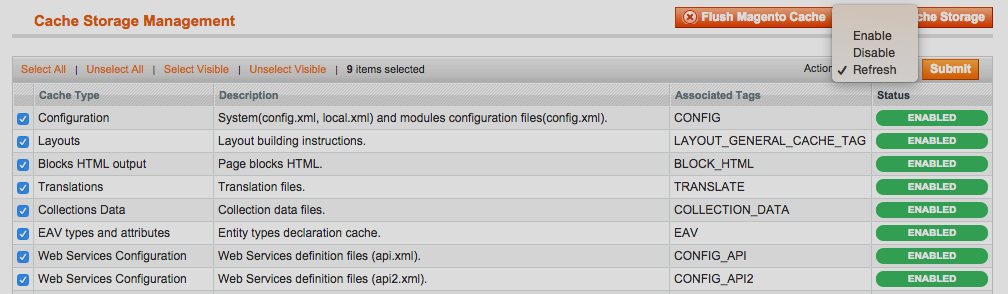
Navigate to System > Cache Management, then select all cache types. Click the Actions drop-down (top right) and select “Enable”. Click Submit. After enabling, browse a few pages to warm the cache, then test load times and server response in your browser’s network tools.
- Core/Layout/Block Cache: speeds up rendering components of a page; it does not cache the entire page.
- Full‑Page Cache (FPC), including Varnish when configured: caches complete pages for faster delivery.
Improve Magento Performance by Cleaning Magento Logs
Over time, Magento’s logs can grow large, increasing backup times and adding overhead to database operations. Enabling automated log cleaning keeps storage under control and helps maintain steady Magento performance. When enabled, Magento’s cron should be running so cleanup occurs automatically; for urgent reductions, use the manual database cleanup described below.
Steps to configure log cleaning:
1. In the Magento Admin, navigate to System > Configuration. 2. In the left menu under Advanced, click “System”. 3. Under “Log Cleaning”, change “Enable Log Cleaning” to “Yes” and configure “Save Log, Days” to 14. 4. Save the configuration and confirm a scheduled cleanup is created, ensuring your cron is running.

Clean the Database to Improve Magento Performance
Beyond automatic log rotation, periodic database cleaning helps control bloat, improve query execution, and keep backups lean. Always make a full database backup before maintenance, and perform changes during low-traffic windows. This is a manual, one-time cleanup that complements (but does not replace) cron-based log cleaning.
You can manually clean the database by truncating the following tables:
-
log_customer
-
log_quote
-
log_summary_type
-
log_url
-
log_url_info
-
log_visitor
-
log_visitor_info
-
log_visitor_online
Practical tips for safe cleanup:
- Back up the database first and confirm the backup can be restored.
- Use truncation only on the log tables listed, not on transactional or catalog data.
- After cleanup, run reindexing where relevant and clear Magento caches.
- Schedule regular maintenance so logs never grow excessively large again.
Additional steps to speed up Magento
1. Use a Full‑Page Cache (FPC) or Varnish (or both). Full‑page caching can store entire HTML outputs for anonymous users, reducing PHP execution and database queries. Example scenario: a category page that previously took multiple seconds to render can be served in a fraction of the time once cached, lowering server load and handling traffic spikes more gracefully. This is distinct from the core/layout/block cache in Cache Management.
2. Use a CDN. Offloading images, CSS, and JavaScript to a content delivery network brings assets closer to users around the world. Example scenario: customers in another region fetch static files from a nearby edge location, cutting latency and improving first paint on mobile connections.
3. Host on a dedicated server with SSD. Faster disks and dedicated resources reduce I/O wait and avoid noisy-neighbor slowdowns. Example scenario: indexing and cache warming complete more quickly, and concurrent shoppers experience more consistent response times during peak periods.
If you need help with speeding up your Magento store please speak with a member of our team today on (UK) +44 (0) 2920 837 438 or (US) +1 305-762-0130, via Twitter @thegenielab or by E-mail wish@thegenielab.com.
In summary, enabling Gzip and browser caching, merging and minimizing assets, turning on flat catalog and core/layout/block caching, and keeping logs and database tables clean form the foundation for speeding up Magento. When combined with full‑page caching, a CDN, and solid hosting, these steps create a faster, smoother shopping experience that supports higher conversion rates and stronger SEO signals. Ready to implement these strategies? Reach out for assistance!
