






Join the GenieLab Community
Receive regular updates and inspiration to help your business stay ahead of the game.
Need Assistance?
Contact US today It’s free – Click HERE.You may also like...

Thegenielab: Your Partner for Shopify ADA Compliance
Key Highlights ADA compliance helps Shopify merchants create web accessibility across eCommerce sites for more shop...

How to Implement Control Marketing in Shopify Forms
Introduction Successfully navigating today’s competitive landscape demands that you maintain tight control over your ...

Shopify Theme Detector: Find Any Store's Theme (Free Tool)
Want to know what theme a Shopify store is using? Paste the store's page source into the tool below and we'll scan it...

Mastering Audience Analytics for Customer Loyalty
Key Highlights Understanding audience analytics is crucial for building customer loyalty in today's digital age. Se...

Wholesale Suppliers: The Key to Your Business Success
Introduction For business owners, particularly small businesses, having a steady supply of wholesale products is ver...

The Importance of Featured Products for ECommerce
Key Highlights Featured products are a great way to showcase your best items. Choosing the right products is essen...
HubSpot to Shopify: SEO Impact
Quick Answer
Migrating your ecommerce platform from HubSpot to Shopify can significantly impact your SEO performance, especially in terms of page speed and site structure. Many stores see fewer site warnings and cleaner code.
Shopify gives strong SEO basics out of the box. HubSpot shines for lead work, but it is not built to sell online.
Plan your move, map each URL, and test redirects. These steps help in maintaining SEO during migration.
At a glance
- Shopify SEO benefits include fast pages, clean themes, and solid defaults.
- HubSpot is great for leads, email, and content tools.
- Both can host blogs and landing pages for search.
- Shopify adds checkouts, carts, and rich product markup.
- Careful URL mapping and redirects protect rankings.
Key terms explained
SEO is how you help people find your site on search. It covers content, links, speed, and tech setup.
Inbound marketing means you draw people in with helpful content. You turn visits into leads and then into sales.
Cloud-based SAAS means tools you use online by subscription. The vendor runs the servers and updates.
HubSpot and Shopify, in short
HubSpot helps teams attract, track, and nurture leads. It has tools for blogs, emails, forms, and contact records.
Shopify is built to sell. It runs a store, takes payments, and can host a blog and pages.
Both can publish content for search. Shopify also links that content to carts and checkouts.
SEO Benefits of Migrating to Shopify
Speed and code quality
Shopify themes are built for speed and clean code. This helps search bots crawl and index pages fast.
HubSpot pages can be fast, yet add-ons may bloat code. Extra scripts can slow load times.
Site structure and URLs
Shopify gives clear paths for products, collections, and blogs. This helps users and search bots find key pages and supports URL structure SEO.
HubSpot lets you shape many paths, which can drift. In time, that can make a maze for bots.
Content and scale
Both can host posts and landing pages that rank. Shopify ties those pages to products and search-rich data.
This link from content to cart can lift intent and clicks.
SEO tools and control
- Shopify lets you edit titles, meta, and alt text.
- It builds sitemaps and supports 301 redirects.
- Apps can add schema, image tools, and audits.
- HubSpot offers on-page tips and content audits.
Where the two platforms overlap
Both can draw visits with blogs, guides, and offers. Both track forms and help you follow up on leads.
Shopify adds carts, payments, and quick links from posts to products. That trims the steps from a read to a buy.
Why Shopify can outperform
Store owners need tools that boost sales and search. Shopify must keep pages light and fast to support that goal.
It also manages updates and servers in one place. That reduces tech drift that can hurt search.
In short, the platform’s core helps SEO at scale. Clean paths, speed, and steady updates build trust with bots.
Real-world audit results
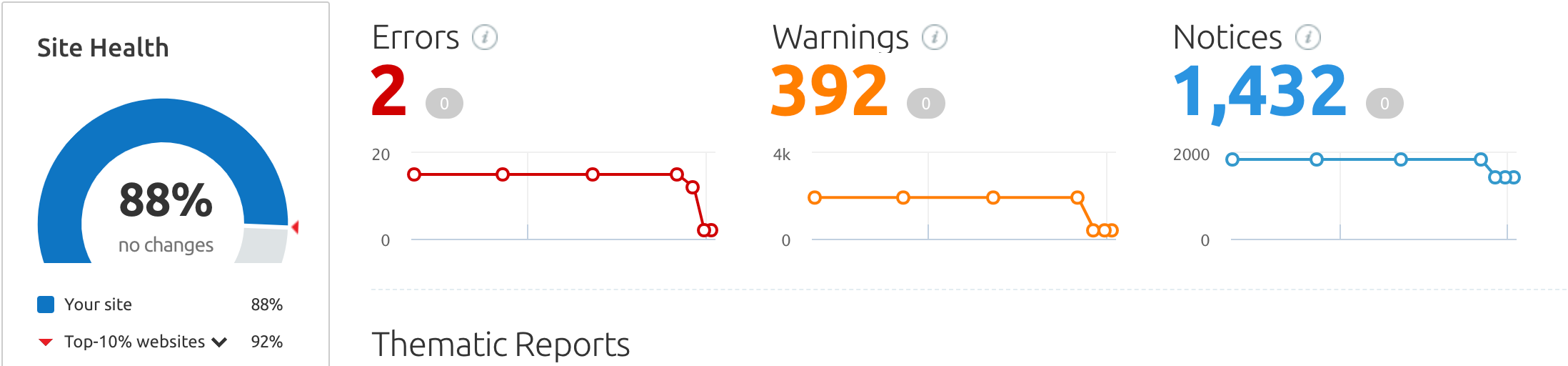
One client moved a non‑store site from HubSpot to Shopify. We saw fewer warnings and notices in the SEO audit.
Warnings fell by 79.6% from 1,921 to 392. Notices fell by 22.5% from 1,849 to 1,432 during the move.
Overall site health rose from 78% to 86% with the same errors. After fixes, health reached 88% for a 10% gain.
Cost, growth, and future plans
You may start with a simple site, not a store. Shopify can host that now and support sales later.
Hosting costs tend to be lower for many plans. You can scale content and add sales when the time is right.
Social and app integrations
People spend large time on social apps. Your brand needs fresh posts and content that fits each channel.
Shopify has many apps for feeds and posts. You can add images from Instagram or pull short updates.
There are thousands of apps for search, speed, and UX. HubSpot has fewer choices for store use.
Step-by-step ecommerce migration plan
1) Audit and goals
List your top pages, posts, and forms. Set goals for traffic, leads, and sales.
Export current URLs, titles, and meta data. Note backlinks and key terms that rank.
Practical step: Crawl the site and mark any thin or old pages.
2) Strategies for Effective URL Mapping
Match each old URL to a new Shopify URL. Keep slugs short and clear.
Plan 301 redirects for every change. Avoid chains and loops. When transferring data from HubSpot to Shopify, keep URL structure stable and use 301s to preserve SEO value.
Practical step: Use a spreadsheet to track source and target paths.
3) Rebuild content
Move copy, images, and files into Shopify. Keep key headings and intent the same.
Trim fluff and split long walls of text. Add clear links to related products.
Practical step: Update image alt text with plain, short terms.
4) On-page SEO
Set unique titles and meta for each page. Use clear, human language. These are core ecommerce SEO strategies.
Add internal links between posts, collections, and products. Keep anchor text short.
Practical step: Fill out schema via an app if needed.
5) Tech setup
Choose a fast, well built theme. Limit apps to what you need.
Enable sitemaps and check robots rules. Connect Search Console and Analytics.
Practical step: Test Core Web Vitals on key pages.
6) Redirects and launch
Upload redirects before go‑live. Test a sample of old links for a 301 hit.
Fix any broken links found in tests. Push the site live in a low‑traffic window.
Practical step: Submit the new sitemap after launch.
7) Monitor and refine
Track rankings, crawl stats, and errors. Watch index coverage and speed.
Improve weak pages with better copy and media. Build links to key URLs.
Practical step: Log wins and losses each week for 8 weeks.
SEO challenges during platform migration
- Missing 301s that drop link value and traffic.
- Slow themes or heavy scripts that hurt speed.
- Title and meta gaps on moved pages.
- Thin copy that fails user intent.
Metrics that matter
- Organic clicks, impressions, and query trends.
- Index status, crawl rate, and errors.
- Core Web Vitals and page size.
- Lead forms, add‑to‑cart, and sales.
FAQ
Will my rankings drop after the move?
Short dips can occur after a platform change. Strong redirects and clean pages help keep results steady.
Can Shopify handle complex blogs?
Yes. You can run full blogs with tags and archives. Link posts to products to drive sales.
Do I need new content for Shopify?
You can reuse strong content. Improve weak pages and match search intent better.
How long does a migration take?
Time varies by site size and needs. Planning, mapping, and tests reduce delays.
What SEO tools do I get in Shopify?
You can edit titles, meta, and alt text. Sitemaps, redirects, and many helpful apps are also there.
Conclusion
Shopify offers fast pages, strong defaults, and clean paths for bots. It links search content to carts, which helps turn visits into sales.
HubSpot excels at lead work and content plans. Yet for store growth and search at scale, Shopify often wins.
Have you analyzed your current platform's SEO performance? Look at load time, index health, and user experience.
Plan the move with care, map every URL, and test redirects. Your site can gain health and keep traffic through the change.
Switching platforms is a one-time opportunity to fix everything you've been putting off.
Our Shopify Plus agency handles the full migration — from HubSpot or any other platform — and configures your new store for maximum SEO performance from day one.
If you want advice on your plan, email us at wish@thegenielab.com. We are glad to help. What challenges did you face migrating platforms?
